
Configure OAuth 2.0 client credentials for API authentication, including how to provision credentials in the Business Portal, request and cache access tokens, and implement responsible token management patterns.
PayNearMe supports OAuth 2.0 for API version 3.0+ using the industry-standard client credentials grant. OAuth provides token-based authorization for system-to-system API access. You manage client credentials and access tokens in the PayNearMe Business Portal without contacting Customer Support for each token.
PayNearMe continues to support HMAC signature authentication for API requests and for callbacks. You can use both methods on the same site: requests that include a Bearer token in the Authorization header use OAuth while requests without that header use signature authentication.
Authorization vs. AuthenticationOAuth 2.0 is an authorization protocol. It grants your application controlled access to PayNearMe API resources using access tokens. It does not replace consumer-facing login flows in your application.
Client Pre-Requisites
Before you provision OAuth credentials, confirm the following:
- Your integration uses API version 3.0+. OAuth is not available for API versions 1.8 or 2.0.
- OAuth is enabled for your site by your PayNearMe Technical Account Manager (TAM).
- You have Business Portal access with both Developer and Admin permissions so you can provision sites and manage credentials.
PayNearMe SetupYour TAM will enable OAuth for your site before you can provision credentials. Contact them if the API Client Credentials page is not available/visible in your Business Portal.
Quick Start
- In the Business Portal, provision your site for OAuth (one-time action per site).
- Generate client the following credentials: Client ID, Client Secret, and Audience.
- From your application, request an access token from the PayNearMe Token Endpoint URL using the client credentials grant.
- Cache the access token and reuse it for API calls until it is near expiration.
- Call PayNearMe API endpoints using the
Authorization: Bearer {access_token}header. - Request a new access token when the current token is near expiration or has expired.
sequenceDiagram
  participant Client as ClientApplication
  participant Portal as BusinessPortal
  participant Auth as TokenEndpoint
  participant API as PayNearMeAPI

  Client->>Portal: Provision site and generate credentials
  Client->>Auth: POST client_credentials token request
  Auth-->>Client: access_token and expires_in
  Client->>Client: Cache token until near expiry
  Client->>API: API call with Authorization Bearer token
Generating Credentials in the Business Portal
To generate and configure your OAuth credentials, log into the Business Portal and complete the following steps:
-
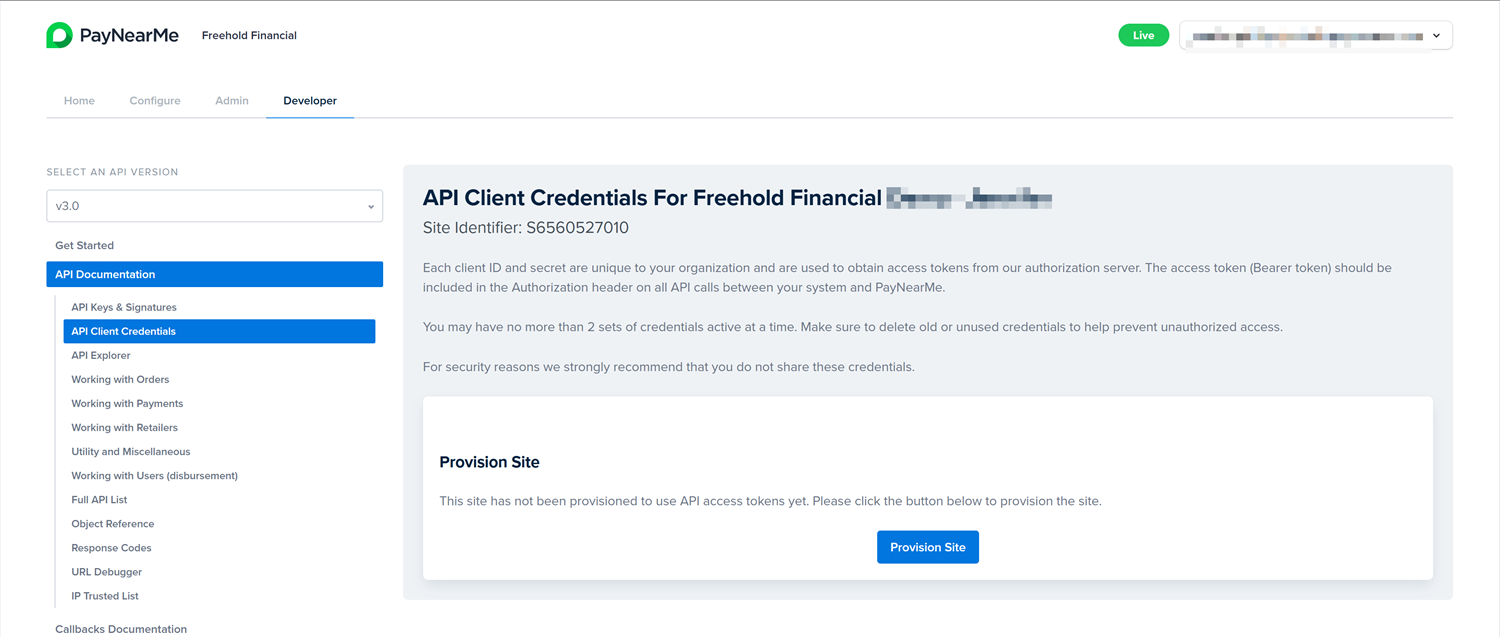
Navigate to Developer > API Documentation > API Client Credentials.
-
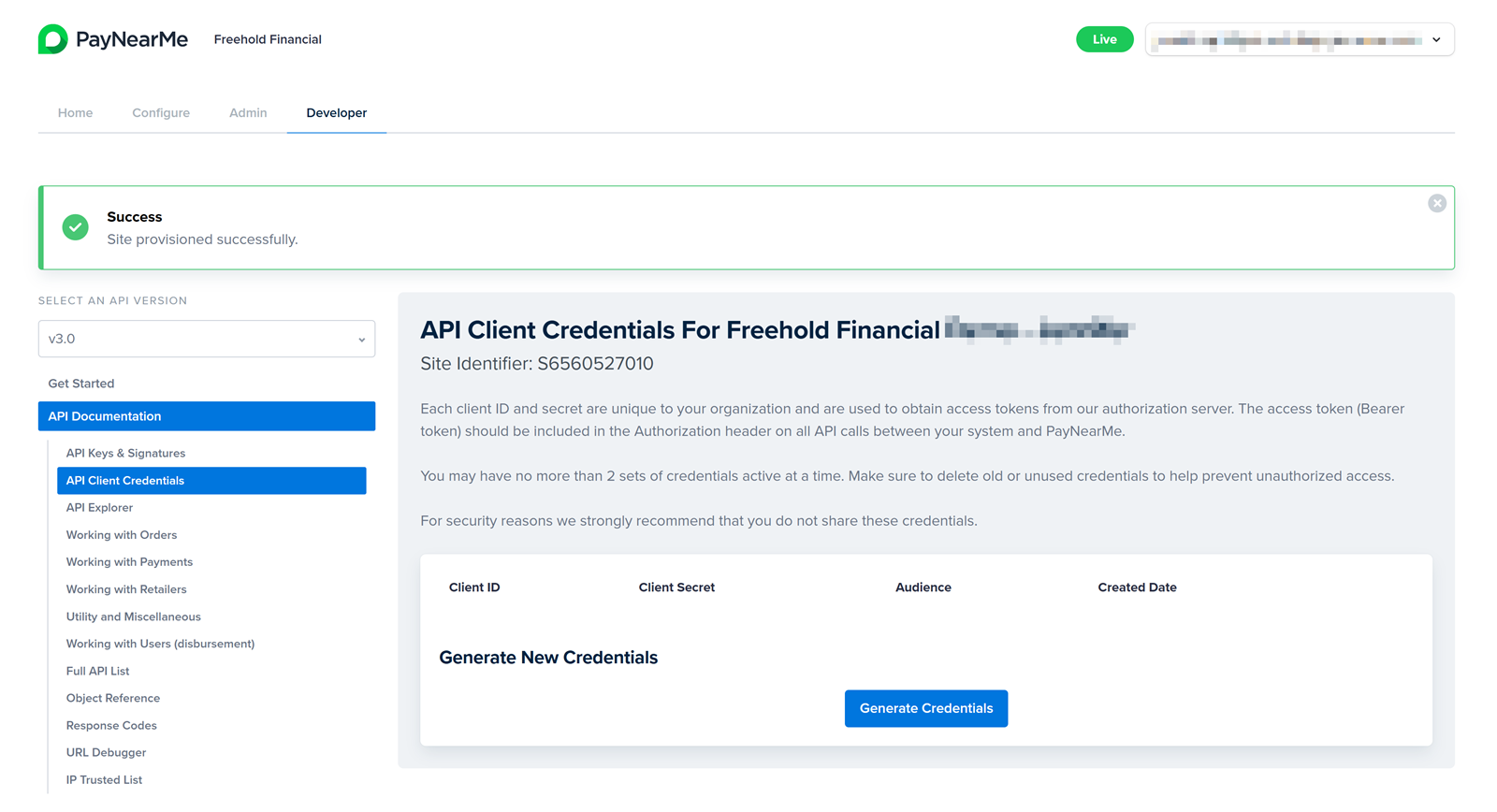
Click Provision Site. This is a one-time action for each site. A confirmation success message displays. Provisioning creates a scope in the PayNearMe identity provider and ties it to your site's external ID.
-
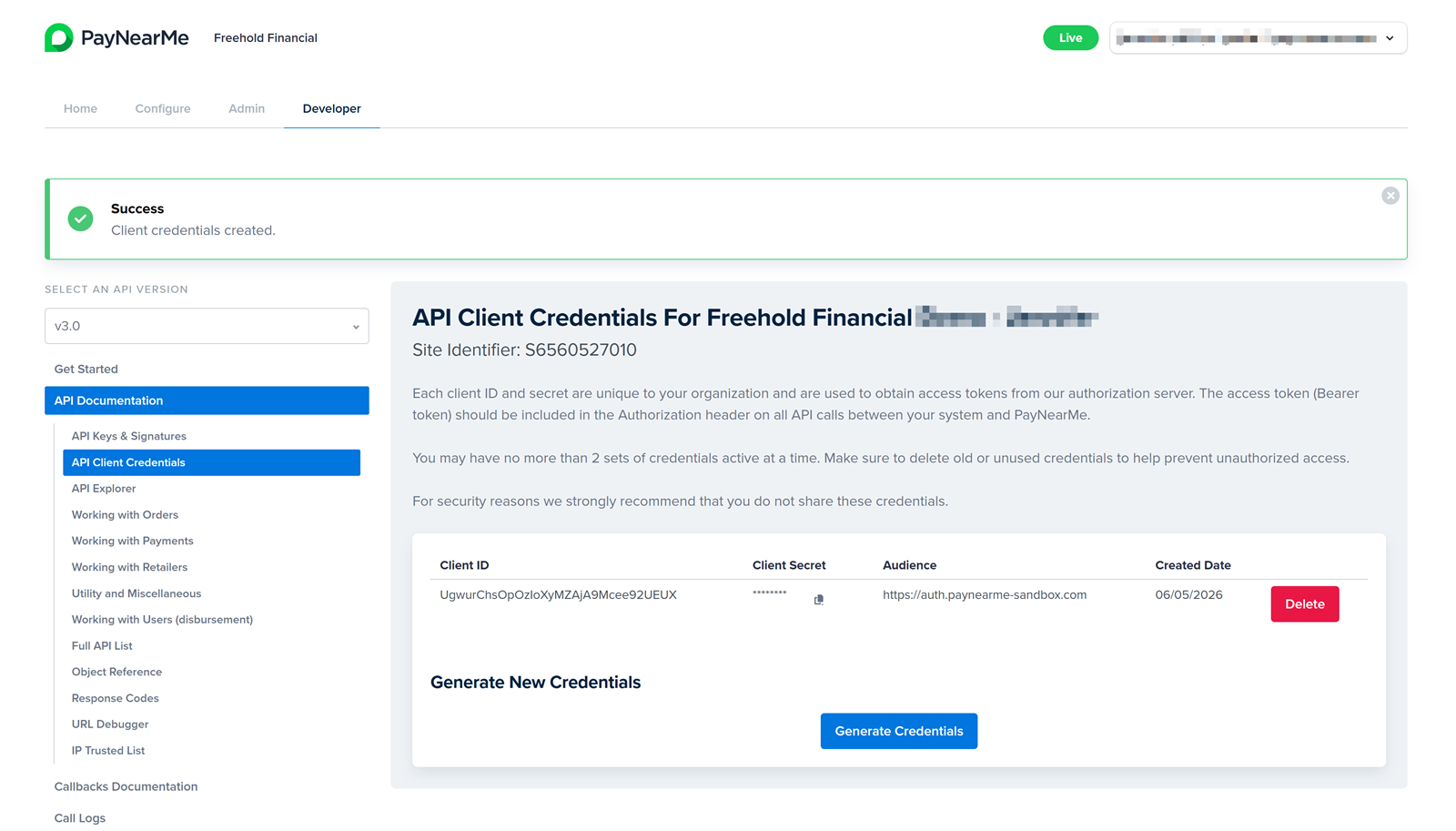
Click Generate Credentials. A success confirmation message displays.
-
Verify that Client ID, Client Secret, Audience, and Created Date display correctly.
-
Use the clipboard icon to copy the Client Secret. Store the Client ID, Client Secret, and Audience in a secure location (e.g., a secrets manager).
As long as the Client Secret is not exposed, you do not need to routinely change it.
Credential Limits and Rotation RequirementsEach site can only maintain a maximum of two credential sets. Each set can request tokens from PayNearMe. If two sets exist, the Generate Credentials button is disabled until you delete an existing set. PayNearMe allows two sets so you can migrate smoothly from one Client ID/Client Secret pair to another.
Deleting Credentials
You must delete a credential set when:
- The set was used only for testing, or
- You suspect a security incident and need to rotate to a new Client Secret.
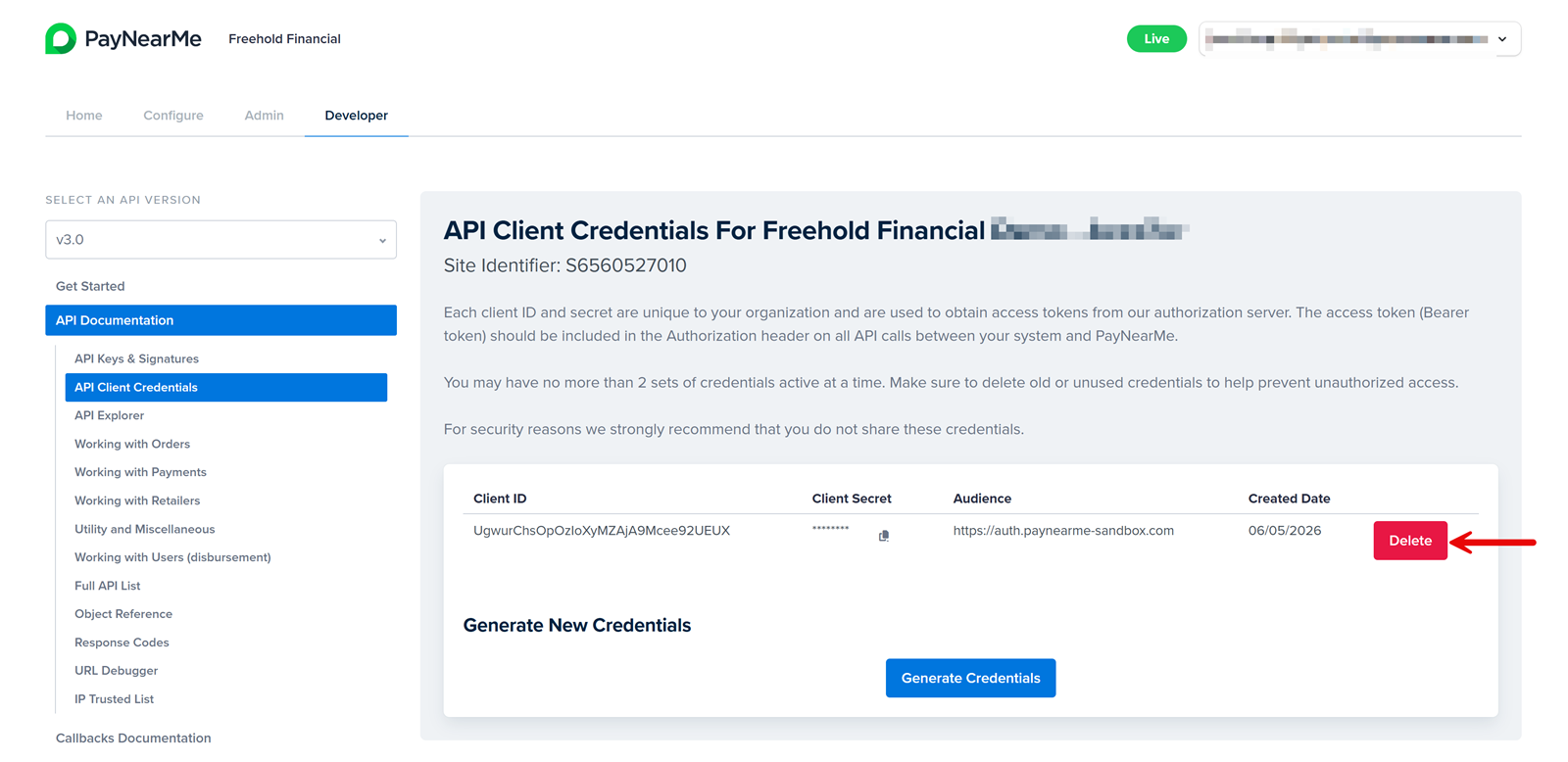
To delete a set, click Delete on the credential row and confirm removal.
Deleted Secrets Cannot be RecoveredAfter you delete a credential set, token requests with that Client ID and Client Secret return
401 Unauthorizederrors. You must generate a new credential set and update your application configuration.
API Keys and Callbacks
Callback verification continues to use API keys and HMAC signatures--even if you use OAuth for outbound API calls. See HMAC Signature Authentication and API Key Rotation Guidelines.
When OAuth is in use for outbound API calls, the API Keys & Signatures page (Developer > API Documentation > API Keys & Signatures) will display the following message:
This site uses API keys for callbacks only. See API Client Credentials for API access setup.
Token Endpoints
Request access tokens from the PayNearMe login host for your environment:
| Environment | Token URL |
|---|---|
| Sandbox | https://login.paynearme-sandbox.com/oauth/token |
| Production | https://login.paynearme.com/oauth/token |
Using the Correct API URLAPI requests use the JSON API base URL for your environment (e.g.,
https://api.paynearme-sandbox.com/json-apifor sandbox). Do not send token requests to the/json-apihost.
Requesting an Access Token
Send a POST request with grant_type, client_id, client_secret, and audience. You can send the body as JSON or as application/x-www-form-urlencoded.
Example Request (JSON Data)
curl --request POST \
     --url https://login.paynearme-sandbox.com/oauth/token \
     --header 'content-type: application/json' \
     --data '{
  "grant_type": "client_credentials",
  "client_id": "YOUR_CLIENT_ID",
  "client_secret": "YOUR_CLIENT_SECRET",
  "audience": "YOUR_TOKEN_AUDIENCE"
}'
Example Request (URL-Encoded Form Data)
curl --request POST \
     --url https://login.paynearme-sandbox.com/oauth/token \
     --header 'content-type: application/x-www-form-urlencoded' \
     --data 'grant_type=client_credentials&client_id=YOUR_CLIENT_ID&client_secret=YOUR_CLIENT_SECRET&audience=YOUR_TOKEN_AUDIENCE'
Example Response
{
  "access_token": "eyJhbGciOiJSUzI1NiIsInR5cCI6IkpXVCJ9...",
  "token_type": "Bearer",
  "expires_in": 86400
}
The expires_inresponse parameter is the token lifetime in seconds. A typical value is 86400 (24 hours). Store expires_in and the time you received the token so your application can refresh the access_token before expiration.
Use the following code samples to request tokens from your application. Replace placeholders with your Client ID, Client Secret, Audience, and the correct Token URL for your environment.
require 'uri'
require 'net/http'
require 'json'

url = URI('https://login.paynearme-sandbox.com/oauth/token')
http = Net::HTTP.new(url.host, url.port)
http.use_ssl = true

request = Net::HTTP::Post.new(url)
request['content-type'] = 'application/json'
request.body = {
  grant_type: 'client_credentials',
  client_id: 'YOUR_CLIENT_ID',
  client_secret: 'YOUR_CLIENT_SECRET',
  audience: 'YOUR_TOKEN_AUDIENCE'
}.to_json

response = http.request(request)
puts response.read_body
<?php
$url = 'https://login.paynearme-sandbox.com/oauth/token';
$body = http_build_query([
'grant_type' => 'client_credentials',
'client_id' => 'YOUR_CLIENT_ID',
'client_secret' => 'YOUR_CLIENT_SECRET',
'audience' => 'YOUR_TOKEN_AUDIENCE',
]);
$ch = curl_init($url);
curl_setopt($ch, CURLOPT_POST, true);
curl_setopt($ch, CURLOPT_POSTFIELDS, $body);
curl_setopt($ch, CURLOPT_HTTPHEADER, ['Content-Type: application/x-www-form-urlencoded']);
curl_setopt($ch, CURLOPT_RETURNTRANSFER, true);
$response = curl_exec($ch);
curl_close($ch);
echo $response;
?>const https = require('https');
const querystring = require('querystring');
const body = querystring.stringify({
grant_type: 'client_credentials',
client_id: 'YOUR_CLIENT_ID',
client_secret: 'YOUR_CLIENT_SECRET',
audience: 'YOUR_TOKEN_AUDIENCE',
});
const options = {
hostname: 'login.paynearme-sandbox.com',
path: '/oauth/token',
method: 'POST',
headers: {
'Content-Type': 'application/x-www-form-urlencoded',
'Content-Length': Buffer.byteLength(body),
},
};
const req = https.request(options, (res) => {
let data = '';
res.on('data', (chunk) => { data += chunk; });
res.on('end', () => { console.log(data); });
});
req.write(body);
req.end();using System;
using System.Net.Http;
using System.Collections.Generic;
using System.Threading.Tasks;
class Program {
static async Task Main() {
var client = new HttpClient();
var url = "https://login.paynearme-sandbox.com/oauth/token";
var form = new FormUrlEncodedContent(new[] {
new KeyValuePair<string,string>("grant_type", "client_credentials"),
new KeyValuePair<string,string>("client_id", "YOUR_CLIENT_ID"),
new KeyValuePair<string,string>("client_secret", "YOUR_CLIENT_SECRET"),
new KeyValuePair<string,string>("audience", "YOUR_TOKEN_AUDIENCE"),
});
var response = await client.PostAsync(url, form);
Console.WriteLine(await response.Content.ReadAsStringAsync());
}
}import java.net.URI;
import java.net.http.HttpClient;
import java.net.http.HttpRequest;
import java.net.http.HttpResponse;
import java.net.URLEncoder;
import java.nio.charset.StandardCharsets;
import java.util.stream.Collectors;
import java.util.Map;
public class OAuthTokenRequest {
public static void main(String[] args) throws Exception {
String body = Map.of(
"grant_type", "client_credentials",
"client_id", "YOUR_CLIENT_ID",
"client_secret", "YOUR_CLIENT_SECRET",
"audience", "YOUR_TOKEN_AUDIENCE"
).entrySet().stream()
.map(e -> URLEncoder.encode(e.getKey(), StandardCharsets.UTF_8) + "=" +
URLEncoder.encode(e.getValue(), StandardCharsets.UTF_8))
.collect(Collectors.joining("&"));
HttpRequest request = HttpRequest.newBuilder()
.uri(URI.create("https://login.paynearme-sandbox.com/oauth/token"))
.header("Content-Type", "application/x-www-form-urlencoded")
.POST(HttpRequest.BodyPublishers.ofString(body))
.build();
HttpResponse<String> response = HttpClient.newHttpClient()
.send(request, HttpResponse.BodyHandlers.ofString());
System.out.println(response.body());
}
}#!/usr/bin/env python3
import json
import urllib.request
import urllib.parse
url = 'https://login.paynearme-sandbox.com/oauth/token'
data = urllib.parse.urlencode({
'grant_type': 'client_credentials',
'client_id': 'YOUR_CLIENT_ID',
'client_secret': 'YOUR_CLIENT_SECRET',
'audience': 'YOUR_TOKEN_AUDIENCE',
}).encode('utf-8')
req = urllib.request.Request(
url,
data=data,
headers={'Content-Type': 'application/x-www-form-urlencoded'},
method='POST',
)
with urllib.request.urlopen(req) as resp:
print(resp.read().decode('utf-8'))Authenticating API Requests
After you receive an access_token, send API requests with the Bearer scheme in the Authorization header. When you use OAuth for a request, you do not need to include an HMAC signature in the request body.
The following example creates an order in sandbox using an access token and the required parameters for the /create_order endpoint:
curl --request POST \
     --url https://api.paynearme-sandbox.com/json-api/create_order \
     --header 'accept: application/json' \
     --header 'content-type: application/json' \
     --header 'Authorization: Bearer YOUR_ACCESS_TOKEN' \
     --data '{
  "site_identifier": "S2155373459",
  "timestamp": "1636142061",
  "version": "3.0",
  "order_amount": "500",
  "order_currency": "USD",
  "site_customer_identifier": "11223344",
  "order_type": "any",
  "order_is_standing": "true"
}'
Required body fields such as version, site_identifier, and timestamp still apply for version 3.0+ API calls. Omit the signature parameter when authenticating with OAuth.
Token Management
PayNearMe supports on-demand token requests. However, requesting a new token for every API call can exhaust shared token capacity and trigger rate limits. All clients must cache access tokens and refresh only when needed.
Caching RequirementsDo not request a new access token for every API call. Failure to cache and refresh responsibly can result in rate limiting, increased latency, and enforcement of issuance quotas.
Caching Tokens
After you receive a token, store it in a secure cache until it expires. Acceptable options include:
- In-memory cache (single process)
- Redis or another shared cache (multiple instances)
- Secure server-side storage
Do not call the token endpoint before every API request.
Validating Tokens
Before making an API call:
- Check whether the cached token is still valid.
- Request a new token only if the current token is near expiration (within 5-10 minutes of expiration) or has already expired.
Refreshing Tokens
Renew tokens before they expire with proactive refresh, and use single-flight refresh so concurrent workers do not all call /oauth/token at once.
Proactive Refresh
When you receive a token:
- Store the
expires_infrom the response. - Record the
issued_attime (i.e., Unix time when you received the token). - Compute the expiration time:
expiration_time=issued_at+expires_in.
As a best practice, we recommend applying a clock-skew leeway buffer (leeway_buffer) of 60–120 seconds. Tokens should be refreshed when:
current_time ≥ expiration_time - leeway_buffer
For high-traffic systems, you can refresh at 80–90% of the token lifetime in a background job so that live request paths are not blocked upon token refresh.
Single-Flight Refresh
Ensure only one refresh runs at a time per credential set across threads or processes. Concurrent /oauth/token calls from many workers can cause token storms and rate limiting.
Error Handling
Errors on API calls and on the token endpoint require different responses. Refresh and retry once when an API call returns 401 responses. Use exponential backoff and capped retries when /oauth/token returns 429 or 5xx responses.
401 Responses On API Calls
401 Responses On API CallsIf an API request returns 401 Unauthorized:
- Refresh the access token once.
- Retry the original request exactly once with the new token.
- Do not loop indefinitely.
If the retry fails, log correlation identifiers and surface a clear error to operators.
429 Responses On the Token Endpoint
429 Responses On the Token EndpointIf /oauth/token returns 429 Too Many Requests:
- Honor the
Retry-Afterheader when present. - Use exponential backoff with jitter.
- Do not retry aggressively.
5xx Responses On the Token Endpoint
5xx Responses On the Token EndpointFor server errors, use exponential backoff with a capped number of retries and log telemetry for monitoring.
Incorrect vs Correct Patterns
Incorrect - New token on every API call (high risk):
def call_api():
    token = request_new_token()  # Do not do this on every call
    return requests.post(api_url, headers={'Authorization': f'Bearer {token}'}, json=payload)
Correct - Cache and refresh only when needed:
cached_token = None
token_exp = 0

def call_api():
    global cached_token, token_exp
    if not cached_token or time.time() >= token_exp - 300:
        cached_token, token_exp = request_new_token_with_expiry()
    return requests.post(
        api_url,
        headers={'Authorization': f'Bearer {cached_token}'},
        json=payload,
    )
Parent and Child Sites
OAuth client credentials can be configured at different levels:
- Parent site: Credentials at the parent level can be used by the parent and all child sites.
- Child site: Credentials at the child level apply only to that child, not to siblings or the parent.
A child site may use its parent’s token or its own token, depending on where credentials are configured.
Client Responsibilities
Your integration must:
- Cache access tokens after the first successful token request
- Refresh only when the token is near expiration or expired
- Implement exponential backoff for token endpoint errors
- Retry an API call once after refreshing on a
401response - Prevent parallel token storms (single-flight refresh)
Failure to follow these patterns may result in rate limiting, service instability, higher latency, and enforcement of issuance quotas.
PayNearMe SafeguardsPayNearMe may apply additional controls, including:
- Fine-grained machine-to-machine token quotas per Client ID
- Traffic monitoring and alerting for abnormal token request volume
Clients that exceed reasonable issuance thresholds may be investigated or rate limited.
Frequently Asked Questions
Can I use signature authentication and OAuth at the same time?
Yes. If the request does not include a Bearer token in the Authorization header, PayNearMe uses HMAC signature authentication. If the request does include Authorization: Bearer {access_token}, PayNearMe uses OAuth for that request.
When would I still use signatures?
If your integration validates callbacks with HMAC signatures, you still need API keys and signature verification for those inbound messages. Outbound API calls can use OAuth while callbacks continue to use API keys.
Where do I find my site identifier?
Use the same Site ID (or Key Identifier) as for signature-based calls. See Authentication for locating your site identifier in the Business Portal.
Troubleshooting
401 Unauthorized from the Token Endpoint
- Confirm Client ID, Client Secret, and Audience match the values shown when credentials were generated.
- Verify you are calling the correct environment (sandbox vs production token URL).
- If credentials were deleted, generate a new set. Deleted secrets cannot be restored.
401 Unauthorized from an API Call
- Confirm the
Authorizationheader isBearer {access_token}with no typos or extra whitespace. - Check whether the access token has expired. If so, refresh and retry once.
- Verify the Audience used to obtain the token matches your site configuration.
- Ensure the sandbox token is not sent to production API hosts (or vice versa).
Rate Limiting or Token Exhaustion
- Audit your code for a new token request on every API call then implement caching and proactive refresh instead.
- Ensure only one refresh runs at a time across workers.
- On
429responses, respectRetry-Afterand back off.
OAuth Option Not Visible in the Business Portal
OAuth must be enabled for your site by PayNearMe. Contact your TAM or Implementation team if the API Client Credentials page is missing or the Provision Site action is unavailable.