
Making Payments
Once the payment method token has been created, you can use it to make an immediate one-time payment or create a schedule of recurring payments within the Embedded Form. You can also store the token and then use the /make_payment API call at a later time using the stored payment_method_identifier.
Make an Immediate One-Time Payment
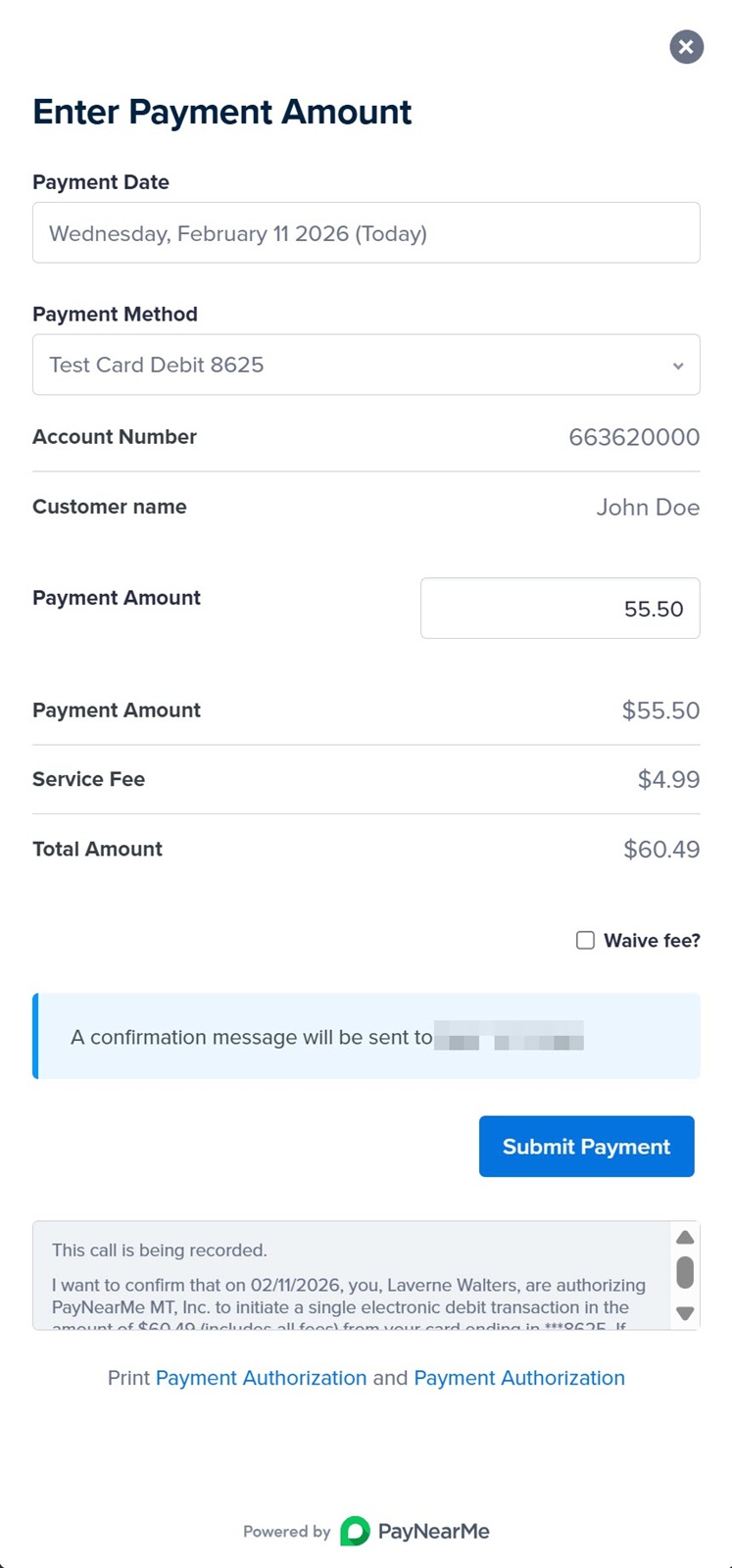
Use the pay=1 parameter to make an immediate one-time payment from within the Embedded Form.
<script src="https://www.paynearme-sandbox.com/api/embedded/Ku6z6P5enC2PiTvrpazZ1g/script.js?pay=1&button=Pay"></script>After selecting an existing payment method or creating a new payment method, the Embedded Form renders the following screen requesting a payment amount and providing payment authorization verbiage:
Create an Immediate Autopay Schedule
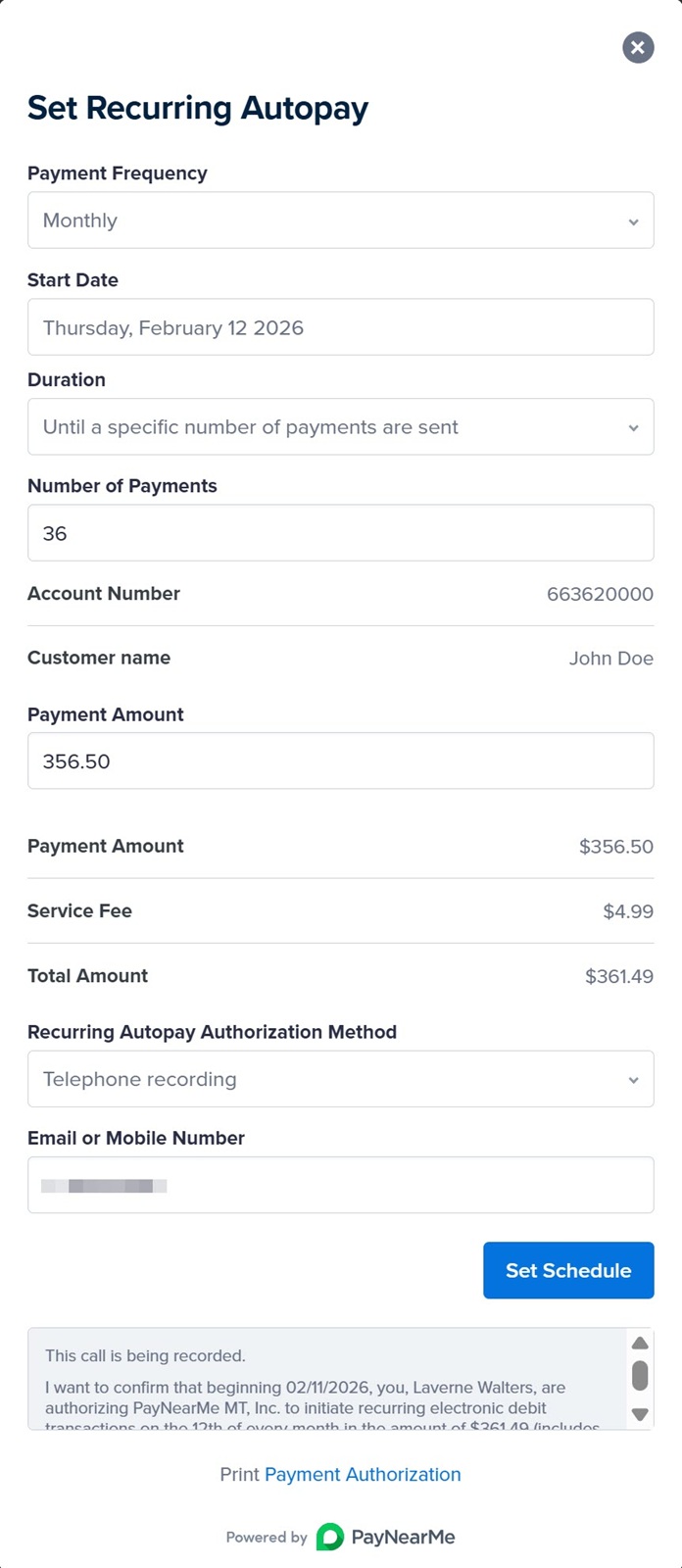
Use the schedule=1 option to create a schedule of recurring payments for the consumer:
<script src="https://www.paynearme-sandbox.com/api/embedded/Ku6z6P5enC2PiTvrpazZ1g/script.js?schedule=1&button=Pay"></script>After selecting an existing payment method or creating a new payment method, the Embedded Form renders the Set Recurring Autopay screen where the agent can select scheduling options on behalf of the consumer.
Make a Payment Using the API
Use the /make_payment API endpoint to create payments using the stored payment methods collected by agents in the Embedded Form. To create a /make_payment request, use the following parameters.
| Parameter | Description | Type | Required? |
|---|---|---|---|
payment_method_identifier | The unique identifier for this payment method. | string | R |
payment_amount | The decimal value of the payment amount. | dec | R |
payment_currency | USD | enum | R |
site_payment_identifier | An arbitrary, merchant-defined string that the client uses to identify the payment. If specified in the /make_payment call, PayNearMe will echo this value back in the Confirmation callback. | string | O |
pricing_schedule_name | Specifies the name of the pricing schedule (e.g.,agent, agent_recurring, consumer, consumer_recurring, consumer_ivr). Supported values can include site-configured pricing schedules. | string | O |
site_channel | The payment channel where this payment method was created. Supported options include the following:
| enum | R |
notification_contact | The consumer's email or mobile number that PayNearMe will contact when payments are made with this payment method. | string | O |
site_identifier | The merchant’s unique Site ID. | string | R |
timestamp | The Unix Epoch time of the call. | string | R |
version | The version of the API you’re using. This version must match the version associated with your API key pair. | string | R |
signature | The HMAC signature that is calculated by running your API Secret Key and the alphabetized, concatenated parameters of the request’s payload through the SHA256 message digest algorithm. | string | R |
curl --location --request POST 'https://api.paynearme-sandbox.com/make_payment' \
--data-raw '{
  "payment_amount": "500.00",
  "payment_currency": "USD",
  "payment_method_identifier": "d041313f4c04c",
  "signature": "5545f6150725bb6f0893fce6cecd25f7c4290d8ac431acba79fa27566a0efc75",
  "site_channel": "agent ",
  "site_identifier": "S2155373459",
  "timestamp": "1668621441",
  "version": "3.0",
  "pnm_order_identifier": "81214331198",
  "site_payment_identifier": "224466881010",
  "pricing_schedule_name": "agent",
  "notification_contact": "214-448-5393"
}'{
"response_code": "0",
"status": "ok",
"payment": {
"payment_made": "2022-11-16 09:57:22 -0800",
"payment_amount": "504.99",
"payment_currency": "USD",
"payment_status": "approved",
"payment_type": "ach",
"payment_account": "Bank of America, NA 6655",
"payment_method_identifier": "d041313f4c04c",
"net_payment_amount": "500.00",
"net_payment_currency": "USD",
"payment_processing_fee": "4.99",
"payment_processing_fee_currency": "USD",
"pnm_processing_fee": "4.99",
"pnm_processing_fee_currency": "USD",
"settled_to_site": "false",
"date_settled_to_merchant": "",
"pnm_payment_identifier": "982519557603",
"retailer_identifier": "FM690776428",
"site_payment_identifier": "224466881010",
"pricing_schedule_name": "agent",
"site_channel": "agent",
"merchant_settlements": {
"merchant_settlement": {
"settlement_method_identifier": "SM736220738",
"settlement_type": "net_payment",
"settlement_amount": "500.00",
"settlement_currency": "USD"
}
}
}
}After receiving the payment response, ensure that you record and store the pnm_payment_identifier value (highlighted above). The pnm_payment_identifier is the unique ID that PayNearMe assigns to that specific payment attempt. This parameter is required if you need to cancel or refund the payment in the future.
Updated 2 days ago