
Chargebacks and Returns
Learn how to process and challenge credit and debit card chargebacks and ACH returns in the PayNearMe Business Portal, including dispute timelines, documentation guidelines, and consumer- and bank-initiated return codes.
Credit and debit card chargebacks and ACH returns are an inevitable part of payment acceptance. High chargeback or return rates can result in fines, rate hikes, and regulatory risks that can jeopardize banking relationships. PayNearMe’s platform helps clients reduce chargebacks and returns through prevention and support.
This article details how clients can process and track chargebacks and returns in the PayNearMe Business Portal.
A Note on NomenclatureThe term chargeback and dispute are used interchangeably. Most card issuers refer to chargebacks as chargebacks while Visa refers to them as disputes.
Handling Second ChargebacksA second chargeback occurs when the issuing bank rejects the merchant's evidence and upholds the cardholders claim. A second chargeback is a continuation of the original dispute, and is also known as pre-arbitration. At that point, no additional evidence can be submitted and the chargeback is finalized unless the merchant elects to pursue network arbitration, which often involves fees in excess of $500.00 (depending on the card network)
When a second chargeback occurs, PayNearMe will not send you a second chargeback notification email. You will only receive an adjustment report showing the subsequent debit and status updates in the Business Portal. The chargeback's status in the Business Portal changes to Lost.
Notifications
PayNearMe has three methods of notifying clients of a new dispute (for credit and debit cards and card payments made via PayPal, Venmo, and Cash App) or ACH return:
- The Reverse Callback – When configured, this callback is triggered when a consumer disputes a payment with his/her debit or credit card issuer or his/her bank issues a return.
- The Daily Returned Payments Report – This report lists all card transactions that have resulted in chargebacks and all ACH transactions that have resulted in returns.
- The Reconciliation Report – This report provides a list of all transactions settled for the merchant that day and includes adjustments for refunds, chargebacks, and ACH Returns.
Handling Chargebacks
Chargebacks, or disputes, are card payment reversals that are triggered by a consumer’s complaint to his/her card issuer about payments he/she deems unauthorized. These include payments made with credit or debit cards as well as mobile wallet payments like PayPal, Venmo, or Cash App. Legitimate reasons for disputing a transaction include the following:
- Fraudulent charges from a compromised credit/debit card
- Duplicate payments
- Wrong Payment Amounts Mistakenly Keyed In
- Unauthorized Payments Caused by a Technical Issue
- Unrecognizable Payee Descriptors
- Payments from a Previously Canceled Recurring Schedule
While chargebacks are an important guardrail to protect consumers from fraud and merchant mistakes, they can also be used by consumers as a method of canceling the payment either through “friendly fraud” or not-so-friendly fraud. This can result in lost money, increased processing costs, and headaches for clients. Use PayNearMe’s Business Portal to challenge chargebacks quickly and efficiently.
Chargeback Statuses
The Business Portal displays one of the following statuses for every chargeback on the Disputes and Returns page and the Payment Details screen, regardless of which processor handled the payment.
| Status | Description |
|---|---|
| Action Required | You must submit evidence or take another action. |
| Under Review | The chargeback or the evidence you submitted is being reviewed. |
| Won | The chargeback was resolved in your favor. |
| Partially Won | A portion of the disputed amount was resolved in your favor. Applies only to Cash App Pay disputes. |
| Lost | The chargeback was resolved against you. |
| Accepted | You accepted the chargeback and will not dispute it. |
| Closed – No Impact | The case is closed. It does not require action from you or create liability for you. |
Previous Status Names
If you're used to the previous status names, use the following table to find the matching status.
| Previous Status | Current Status |
|---|---|
| Open | Action Required |
| Open – Documentation Submitted | Under Review |
| Open – Documentation Received | Under Review |
| Open – Merchant Credited | Under Review |
| Closed – Merchant Credited | Won |
| Closed – Merchant Debited | Lost |
| Closed – 2nd Chargeback – Merchant Debited | Lost |
| Accepted by Merchant | Accepted |
| Accepted / None / Closed – Unknown | Closed – No Impact |
| Error / None | No longer displayed. Every chargeback now shows a standard status. |
Understanding Chargeback Timelines
Chargebacks can take up to 120 days to resolve. Once PayNearMe has notified you of a dispute, you have 29 days to respond by submitting documentation supporting your challenge of the dispute. If you do not respond to the dispute, the case automatically closes at or after 30 days as Accepted or Lost. The following tables display the different events and outcomes that can occur over the course of a chargeback’s lifecycle and the timeframe for each.
Client Accepts or Does Not Respond
| Status | Days Open | Client Credit/Debit | Description | Notification |
|---|---|---|---|---|
| Action Required | 0-29 | Debited | Client is notified and has 29 days to respond. |
|
| Action Required | 0-30 | Debited | Client has not yet challenged the chargeback. | |
| Accepted | 30 | Debited | Client accepted (or auto-accepted) the chargeback; funds remain with the consumer. | Returns/Chargebacks Report |
| Lost | 30 | Debited | Client did not respond within the window (expired); funds remain with the consumer. | Returns/Chargebacks Report |
Client Wins
| Status | Days Open | Client Credit/Debit | Description | Notification |
|---|---|---|---|---|
| Action Required | 0-29 | Debited | Client is notified and has 29 days to respond. |
|
| Under Review | 30-70 | Debited | Client challenges the chargeback with documentation and the case is pending. | Returns/Chargebacks Report |
| Under Review | 70 | Credited | Provisional credit issued. |
|
| Won | 120 | Credited | Client wins and keeps the funds of the transaction. | Returns/Chargebacks Report |
Partially Won (Cash App Pay only) follows the same timeline as Won, but only a portion of the disputed amount is recovered.
Client Loses – Pre-Arbitration/Second Chargeback
| Status | Days Open | Client Credit/Debit | Description | Notification |
|---|---|---|---|---|
| Action Required | 0-29 | Debited | Client is notified and has 29 days to respond. |
|
| Under Review | 30-70 | Debited | Client challenges the chargeback with documentation and the case is pending. | Returns/Chargebacks Report |
| Under Review | 70-119 | Credited | Provisional credit issued. |
|
| Lost | 120 | Debited | Pre-arbitration request received; client lost and funds are debited back to the consumer. |
|
Client Loses
| Status | Days Open | Client Credit/Debit | Description | Notification |
|---|---|---|---|---|
| Action Required | 0-29 | Debited | Client is notified and has 29 days to respond. |
|
| Under Review | 30-70 | Debited | Client challenges the chargeback with documentation and the case is pending. | Returns/Chargebacks Report |
| Lost | 120 | Debited | Client lost and funds remain with the consumer. | Returns/Chargebacks Report |
Chargeback Timelines
The following chart shows the timeframe and statuses associated with each outcome flow detailed in the tables above.
flowchart TD
    D0["Day 0<br/>Consumer disputes a charge with card issuer"] --> D1

    subgraph P1["Days 1-29"]
        D1["PayNearMe receives dispute notice and notifies the client<br/>Status: Action Required<br/>Client has 29 days to respond"]
    end

    D1 --> ACC{"Client accepts<br/>or challenges?"}

    subgraph P2["Day 30"]
        CLOSE30["Status: Accepted or Lost<br/>Client debited"]
    end

    ACC -- "Accepts, or does not respond" --> CLOSE30
    CLOSE30 --> OUT1(["Client Accepts<br/>or Client Loses - No Response"])

    subgraph P3["Days 30-69"]
        DOCS["Status: Under Review<br/>Client uploads documentation<br/>Case is pending, client debited"]
    end

    ACC -- "Challenges" --> DOCS

    subgraph P4["Days 70-119"]
        CREDIT["Status: Under Review<br/>Provisional credit issued to client"]
    end

    DOCS --> CREDIT
    DOCS -. "Client loses<br/>(no provisional credit)" .-> LOST120

    CREDIT --> WIN{"Client wins?"}

    subgraph P5["Day 120"]
        WON["Status: Won<br/>Client keeps the credit"]
        PREARB["Status: Lost<br/>Pre-arbitration<br/>Client debited"]
        LOST120["Status: Lost<br/>Client debited"]
    end

    WIN -- "Yes" --> WON
    WIN -- "No, pre-arbitration" --> PREARB

    WON --> OUT2(["Client Wins"])
    PREARB --> OUT3(["Client Loses - Pre-Arbitration"])
    LOST120 --> OUT4(["Client Loses"])
Chargebacks After a Refund
If you refund a payment and the consumer later disputes that same payment, PayNearMe reverses (unsettles) your settlement for the chargeback as well as for the refund. A refund and a chargeback are separate movements of funds, so both reduce your settlement for the payment.
This applies to credit and debit card payments and to payments made with PayPal, Venmo, and Cash App. It does not apply to ACH payments. For ACH, see Returns After a Refund.
A Refund Does Not Cancel a ChargebackRefunding a payment does not close or prevent a dispute on that payment. If the consumer disputes a payment after you have already refunded it, the consumer can receive both the refund and the chargeback amount. In that case, PayNearMe also debits your settlement for the chargeback, even though you already refunded the payment.
Keep the following in mind:
- The chargeback amount is not reduced by the refund. PayNearMe reverses the chargeback amount, up to the original amount settled to you for the payment, even if you already refunded part or all of it.
- Canceled refunds don't count. If a refund was canceled before it completed, no refund was sent, and the chargeback is handled like any other chargeback.
- You can still challenge the dispute. The timelines and challenge process are the same. If you win, the chargeback amount is credited back to you as described in Understanding Chargeback Timelines. The refund you already sent isn't reversed.
- Both debits appear in your reports. The refund and the chargeback each appear as separate adjustments in your adjustment report.
For more information about refunds, see Processing Refunds.
Guidelines for Chargeback Documentation
Use the following tips when preparing your chargeback challenge documentation. Overall, chargeback documentation should
- Provide clear, accurate, and legible evidence
- Include images and communications if applicable (at least 10-pt. font)
- Be in English (if documentation is not in English, please provide an English translation)
- Provide written terms and conditions of payment arrangement(s) that were accepted by the consumer prior to or during the payment
- Be relevant and concise (to the point)
- Include proof of the customer’s authorization
Get OrganizedThe most important thing you can do to win a chargeback rebuttal is to collect and maintain the right information for every transaction you process. Without proper documentation, your chances of winning are slim to none in most cases. Important information to collect in your database may include the following:
- Accurate consumer contact information
- Written communications with the consumer (i.e. emails, letters, chats, transcripts)
- Past transaction data and historical payment trends
- All loan documents with terms and conditions
Recommended Evidence to Share
When gathering evidence, be sure to include documents that provide the following:
- Evidence on How the Consumer’s Identity was Verified: This can include the consumer’s full name, date of birth, phone number, billing address, and email address.
- Evidence of Relationship:
- Loan Agreement, Affidavit, Authorization form, Bail bond paperwork, etc.
- Copy of all parties (including co-signers) on the loan agreement and references listed.
- A relevant document or contract showing the consumer's signature/authorization.
- Evidence of Consumer Communications
- Written communications are preferred, but notations based on verbal conversations are also useful.
- SMS notifications and text messages can be submitted.
- Any communication with the consumer that you feel is relevant to your case (e.g., emails proving that they received or agreed to the use of the product or service or communication with the consumer where the consumer admits the dispute was a mistake).
- Any receipt(s) or messages sent to the consumer notifying them of the charge (SMS, email, mailed letter, etc.).
- Evidence of Previous Disputed and Non-Disputed Card Transactions
- Has the customer used the card to make previous payments before the dispute?
- Documentation of non-disputed transaction receipts with that same card number.
- Card-Present or Card-Not-Present Transaction: Was the card used in person at any brick-and-mortar locations before the dispute was made?
Processing Chargebacks
After you receive a dispute notification, you will need to log into the Business Portal to begin processing the dispute. The ability to accept or challenge a dispute requires the following user permissions:
- Admin
- Create Customers/Accounts
- Edit Customers/Accounts
- View Customers/Accounts
- View Payments
Accepting a Chargeback
If after investigating, you determine that the payment was mistakenly or incorrectly authorized, you can accept the dispute by not responding within 29 days. The chargeback then closes and the funds remain with the consumer. Depending on how the dispute is closed, its status changes to Accepted or Lost.
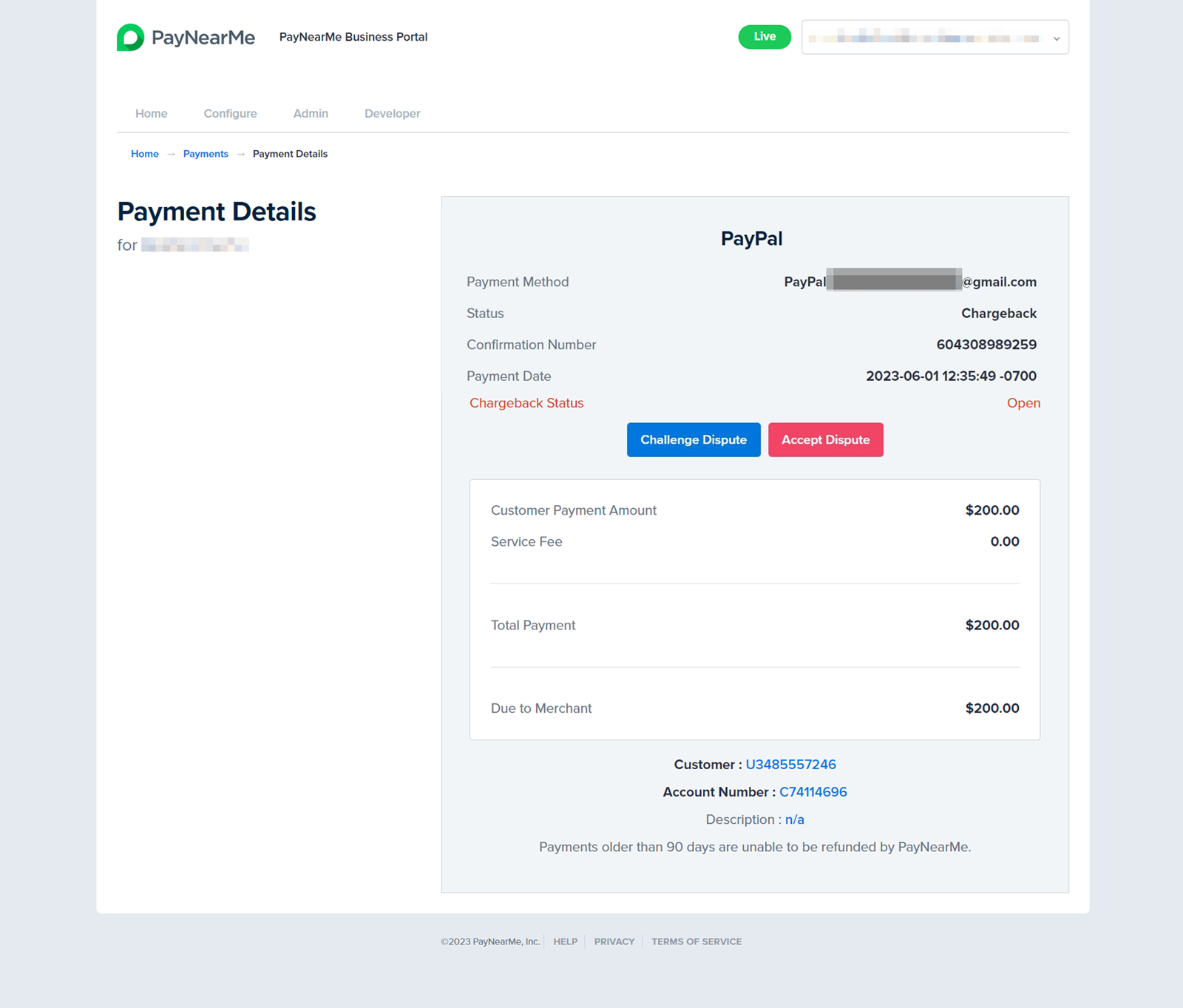
PayPal DisputesPayPal disputes can be accepted prior to the 29-day deadline by clicking the Accept Dispute button on the Payment Details screen. This button only displays for PayPal disputes.
Challenging a Dispute
To challenge a chargeback for a transaction that was properly authorized, complete the following steps:
-
Log into the Business Portal.
-
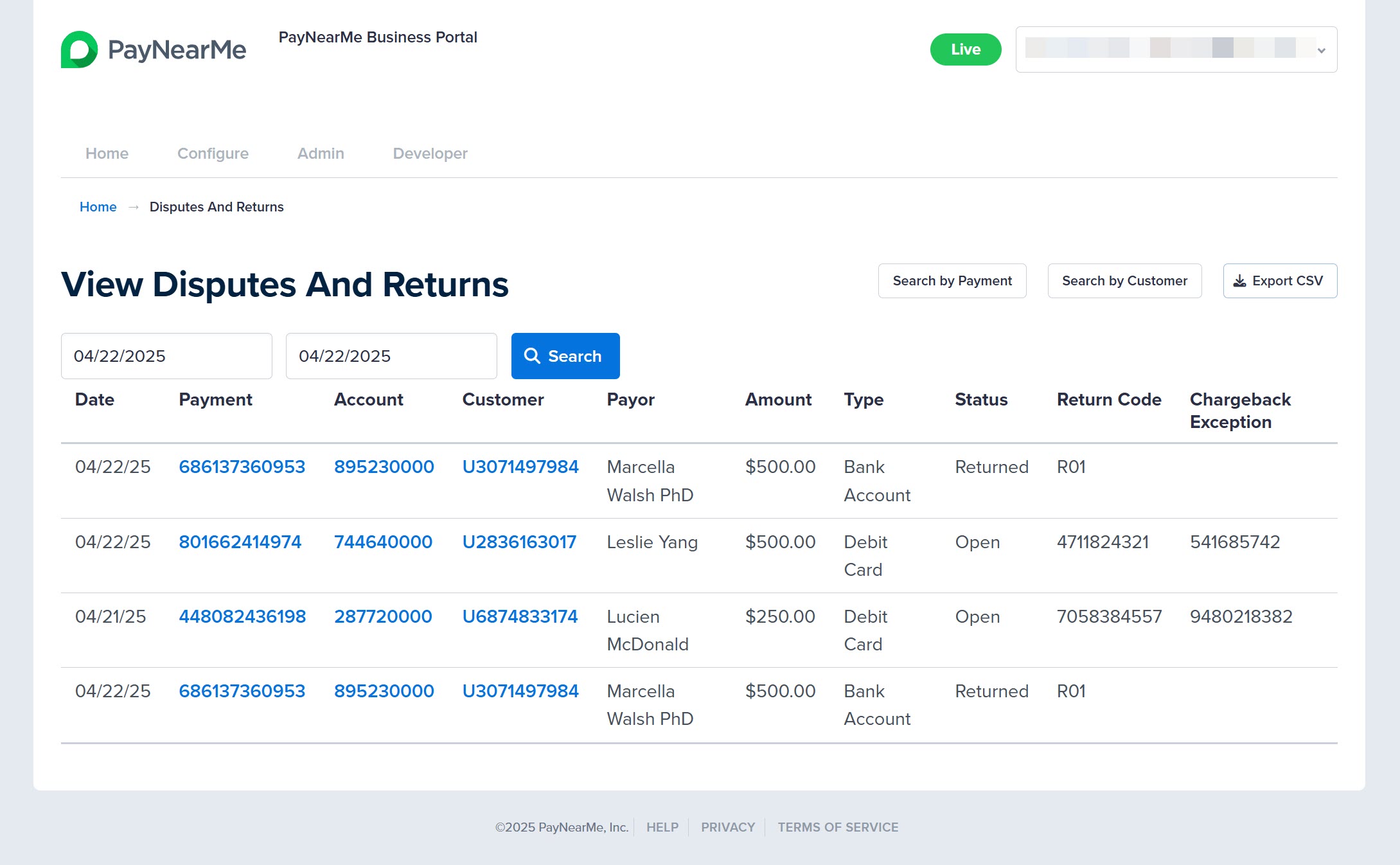
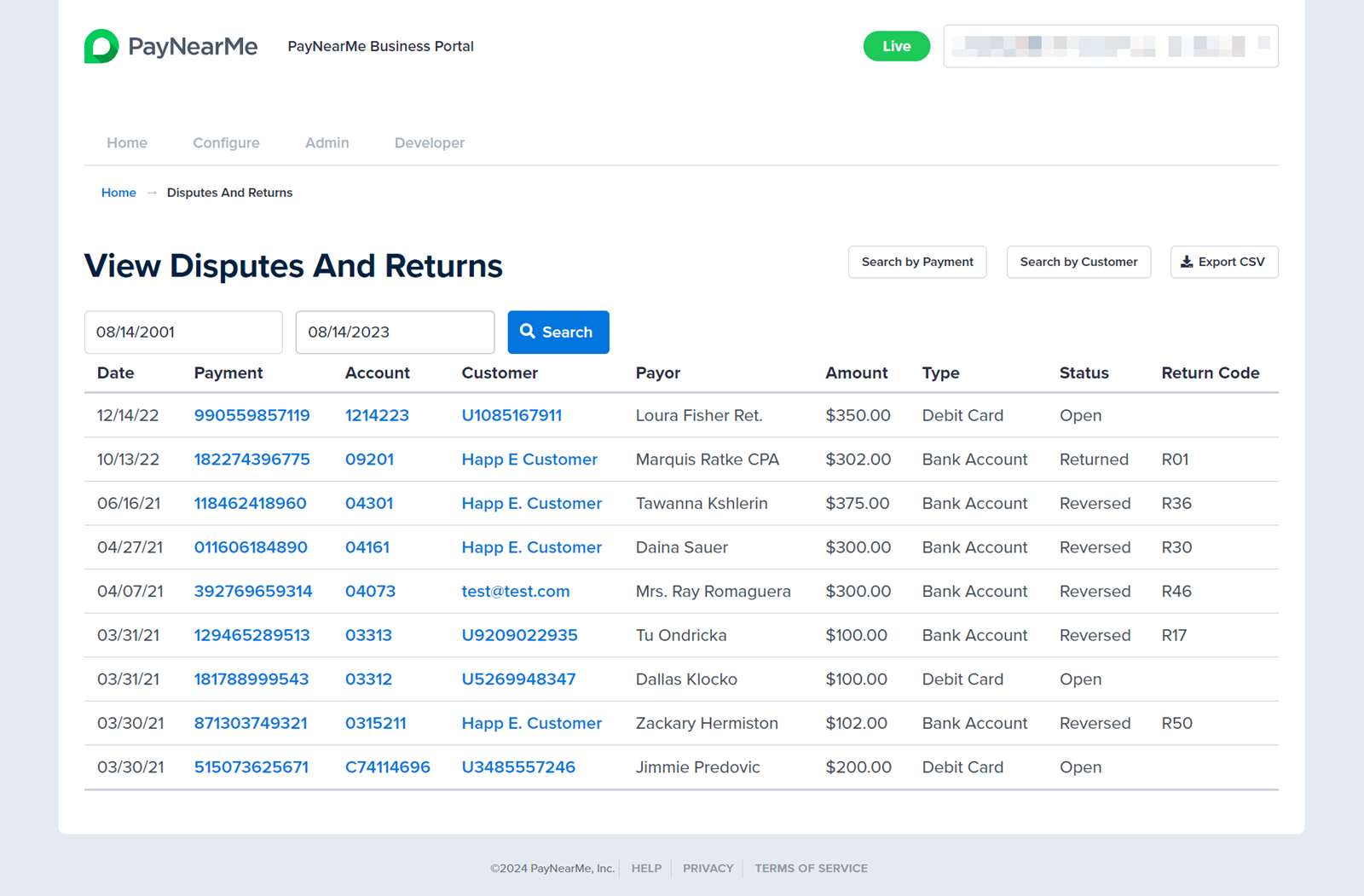
Under the Payments section, click Disputes and Returns. The View Disputes and Returns page displays.
-
Use the date fields to define a date range in which to search for the dispute and then click Search.
-
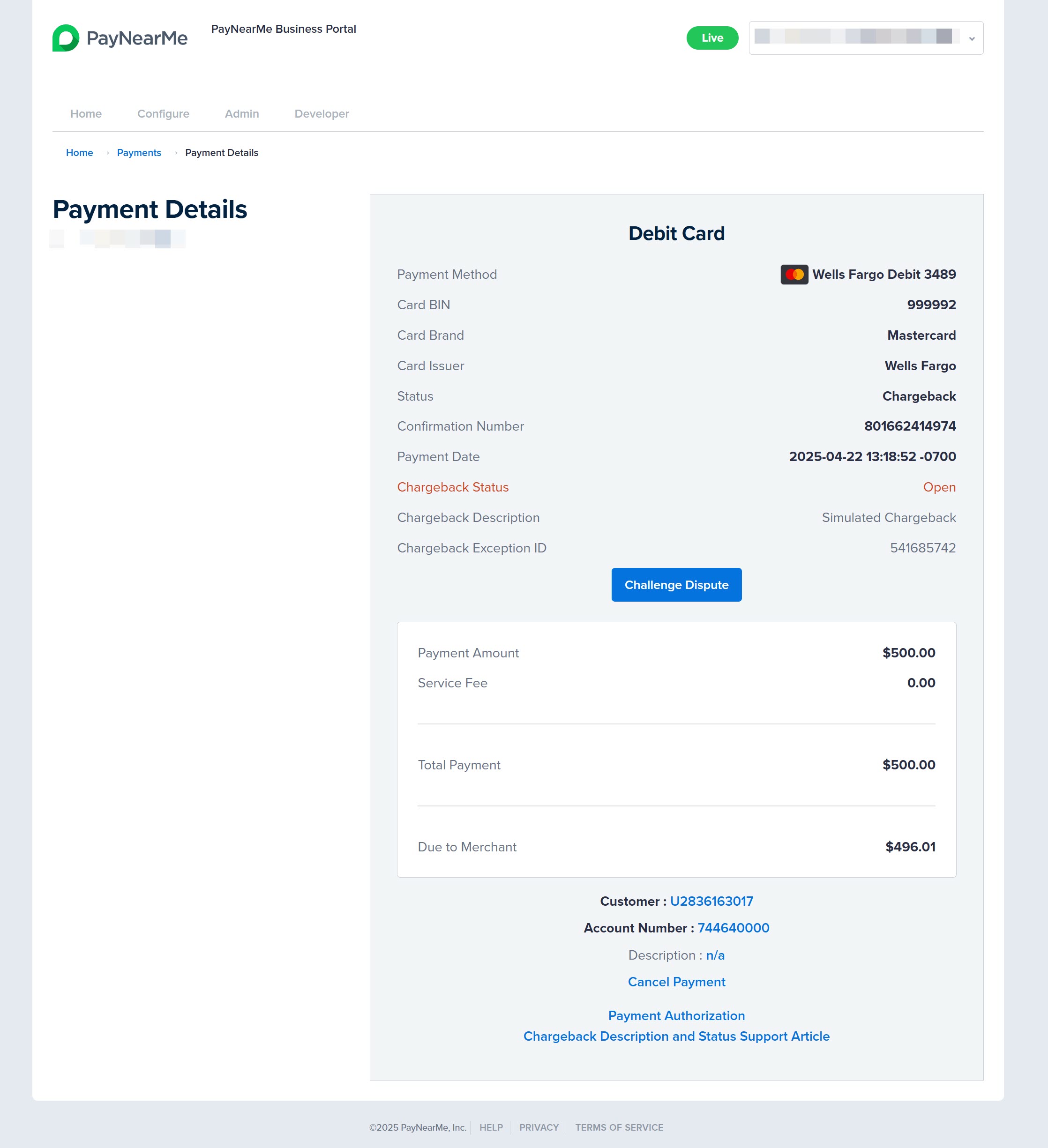
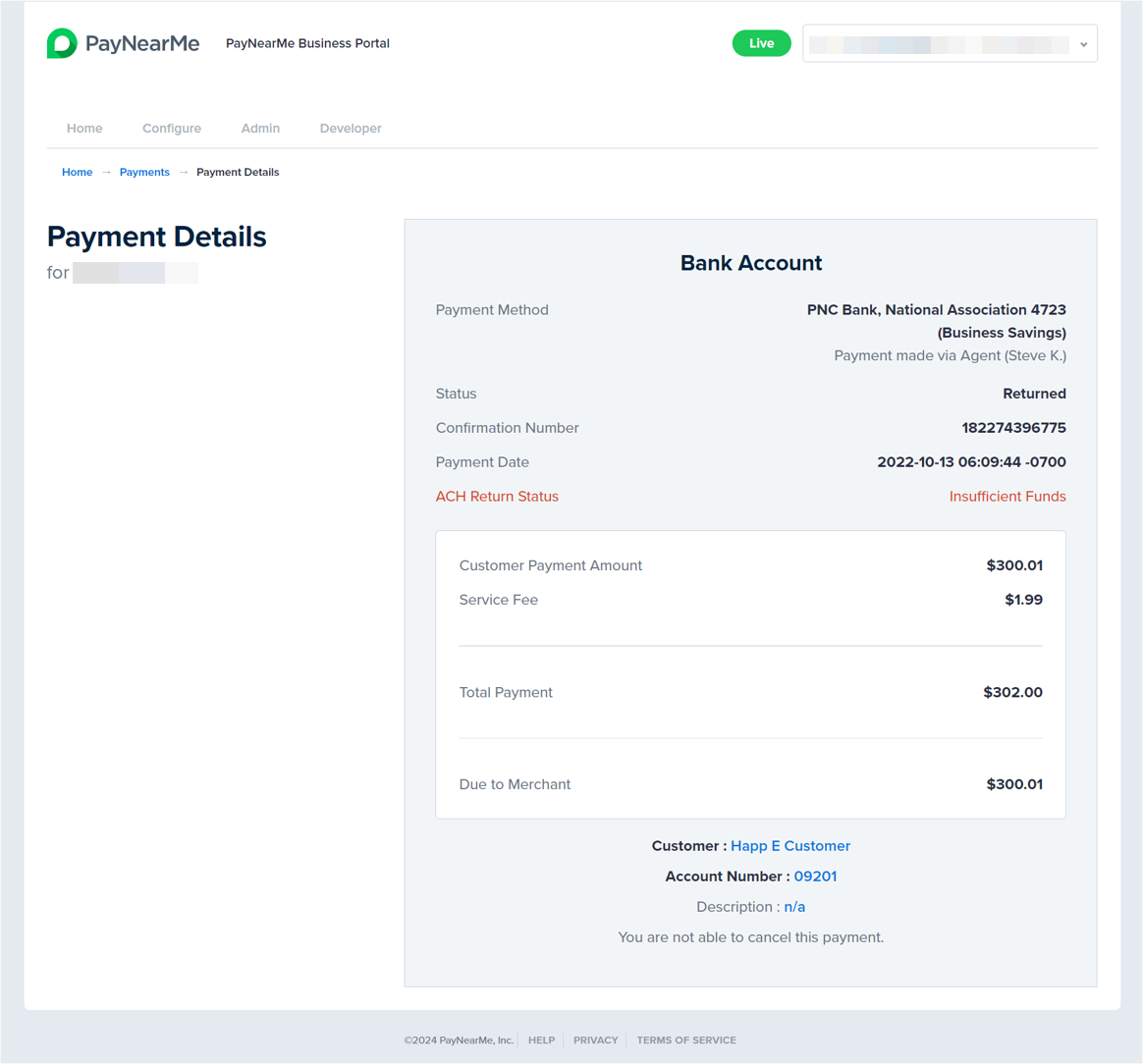
Click the payment link of the chargeback you wish to challenge. The Payment Details screen displays.
-
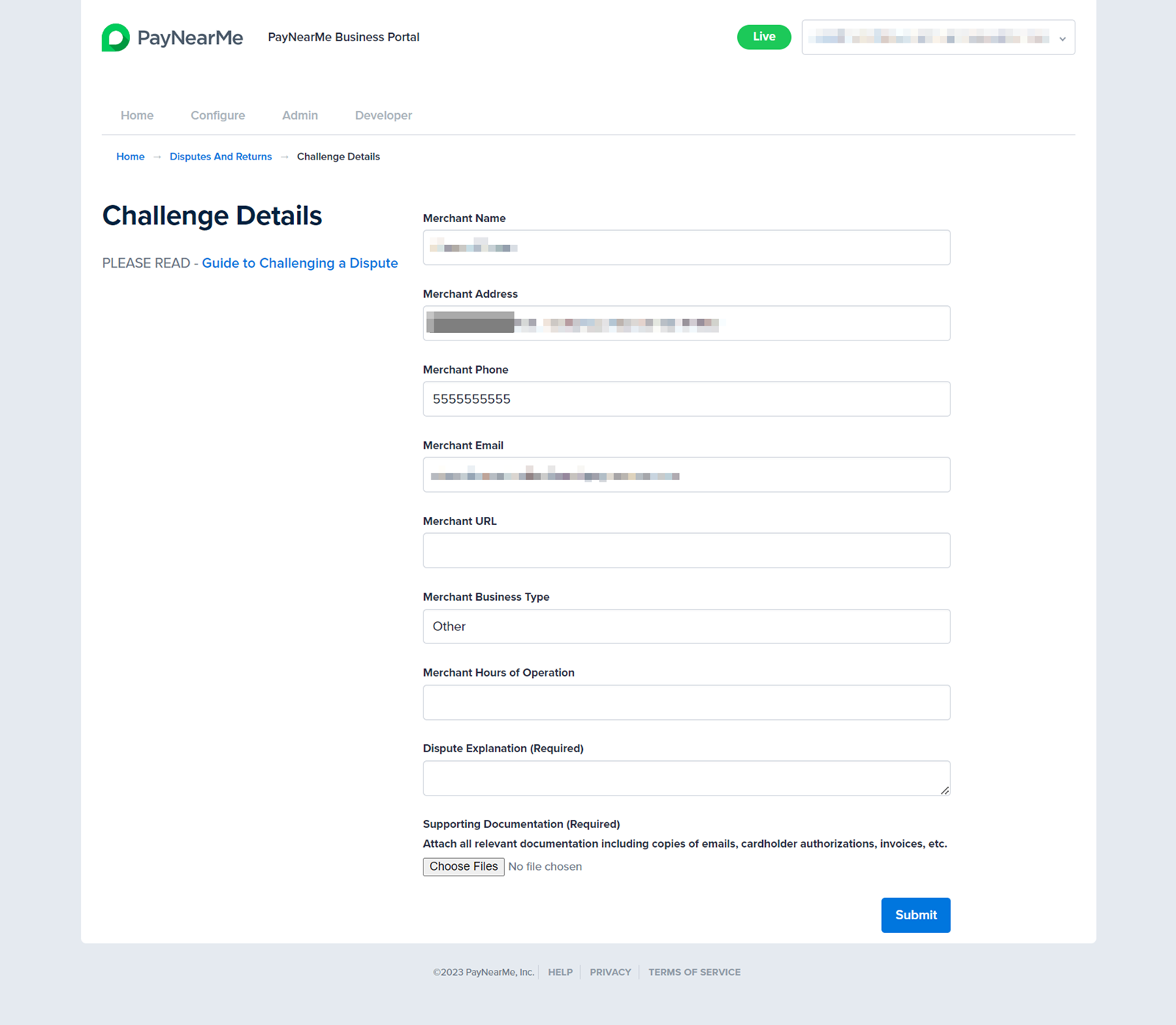
Click Challenge Dispute. The Challenge Details screen displays.
-
The Business Portal pre-fills relevant client data. To include the URL of your online store or your business hours, add them to the Merchant URL and Merchant Hours fields respectively.
-
In the Dispute Explanation field, enter why you’re challenging the chargeback and what evidence you will be providing. For guidance on what to include in your challenge, see Guidelines for Chargeback Documentation section or A Simple Guide to Challenging (and Winning) Chargeback Disputes blog post.
-
Use the Choose Files button to upload any supporting documentation you may have to support your chargeback challenge. This documentation can include Authorization Forms, Loan Agreements, Transaction Receipts, or Emails/SMS Messages.
-
Click Submit. The Business Portal submits the evidence to the card issuer for review, and the chargeback's status changes to Under Review.
Handling Returns
PayNearMe uses proprietary, third-party services to verify bank accounts during payment method creation. While thorough, these services cannot absolutely guarantee that the account is valid with sufficient funds. Return codes come in two varieties: consumer-initiated returns and bank-initiated returns.
Consumer-Initiated Returns
Consumer-initiated returns occur when consumers contact their bank to cancel or revoke the transaction authorization on their account. Typically, consumers have up to 60 days to initiate the return and neither PayNearMe nor the client can object or reject the return.
If the consumer initiates the return after 60 days of the original debit date, PayNearMe's Compliance Team will work with the client to submit a Proof of Authorization (POA) document to reject the return. The bank must receive POA documents within 5 business days after receiving the return, so all requests from PayNearMe's Compliance Team should be prioritized as urgent. The type of authorization documentation required depends on how the payment's SEC code.
PayNearMe’s Compliance Department works directly with clients to submit POA documentation for eligible returns.
Consumer-initiated returns typically occur with the following return codes:
| Return Code | Cause | Time Frame |
|---|---|---|
| R05 | Unauthorized debit using corporate SEC code | 60 Calendar Days |
| R07 | Consumer revoked authorization (i.e., the consumer originally authorized the transaction and then revoked it) | 60 Calendar Days |
| R08 | Stop Payment requested on transaction | 60 Calendar Days |
| R10 | Unknown originator and/or unauthorized to debit receiver’s account | 60 Calendar Days |
| R11 | Consumer states debit is not within authorization terms (i.e., consumer was charged too early in the payment cycle or charged too much money) | 60 Calendar Days |
| R29 | Corporate consumer states debit is unauthorized. | 2 Business Days |
See ACH Return Codes for a full list of ACH return codes.
Bank-Initiated Returns
Bank-initiated returns can occur because of administrative errors like “mistyped” account numbers, or the bank’s own fraud prevention measures, or insufficient funds in the account. In fact, insufficient funds returns make up the majority of PayNearMe’s return volume. Bank-initiated returns typically occur within 2 business days–when the transaction fully processes. Common bank-initiated return codes include the following:
| Return Code | Cause | Time Frame |
|---|---|---|
| R01 | Insufficient funds | 2 Business Days |
| R02 | Account closed | 2 Business Days |
| R03 | Unable to locate account/no account | 2 Business Days |
| R04 | Invalid account number | 2 Business Days |
| R06 | Originating Financial Depository Institution (ODFI) requested return | Not Defined |
| R09 | Uncollected funds | 2 Business Days |
| R13 | Invalid ACH Routing Number | Next File Delivery Time after processing |
| R16 | Account frozen | 2 Business Days |
| R17 | Suspicious entry with invalid account number or return of improper reversal | 2 Business Days |
| R20 | Non-transaction account | 2 Business Days |
| R23 | Receiver refused credit | Upon Receipt of Refusal |
See ACH Return Codes for a full list of ACH return codes.
Returns After a Refund
If you refund an ACH payment and the original ACH debit is later returned, PayNearMe reverses (unsettles) your settlement for the return as well as for the refund, as long as the refund had already been sent when the return arrived. A refund and a return are separate movements of funds, so both reduce your settlement for the payment.
This applies to ACH payments only. For card and wallet payments, see Chargebacks After a Refund.
The outcome depends on when the return arrives:
| When the return arrives | What happens |
|---|---|
| While the refund is still pending | PayNearMe does not complete the refund, because the original payment is being returned to the consumer. Your settlement is reversed once, for the return. |
| After the refund has been sent | The refund is not affected. PayNearMe reverses your settlement for the return in addition to the refund, so your settlement is reduced twice for the payment. |
For more information about ACH refund timing, see ACH Transaction Timelines and Processing Refunds.
Viewing Returns in the Business Portal
To view a returned transaction in the PayNearMe Business Portal, complete the following steps:
-
Log into the Business Portal.
-
Under the Payments section, click Disputes and Returns. The View Returns and Disputes page displays.
-
Use the date fields to define a date range in which to search for the return and then click Search.
-
Click the payment link of the return you wish to view. The Payment Details screen displays.
Protecting Your Business from Returns
The PayNearMe platform has a built-in risk engine that will automatically block ACH accounts after a specific number of returns. For example, PayNearMe automatically blocks an ACH account after two R01- Insufficient Funds returns.
You can also use PayNearMe’s standard Business Rules to help protect from returns. PayNearMe’s business rules are logic-based if/then statements used to perform automated processes that support your unique business operations. These rules mitigate risk, reduce operating expenses, and decrease the time and expense involved with payment returns.
For more information, see Customizing the Platform with Business Rules and consult your PayNearMe Technical Account Manager.
Frequently Asked Questions about Chargebacks and Returns
Q. If a customer makes a payment to their account via PayNearMe, how can they dispute it if they made the payment with their unique PayNearMe code from their own phone?
A. US consumer protection laws allow consumers to easily dispute charges by claiming they were “unauthorized” so that the consumer's bank will pull money from us. It is the same for all processors. It is up to lenders to prove that their consumer is mistaken about authorization. Fortunately, PayNearMe has made it easy to challenge the dispute online and win the dispute 50% of the time (compared to other processors if the option is even available). Remember, we are not fighting on your behalf, but will submit your challenge in a clean, easy-to-decide e-format so banks can decide for you.
Q. What is the status of my disputed charge? It has been over a month since I challenged it.
A. The card-issuing bank is responsible for updating the chargeback status displayed in the portal. While the bank reviews your evidence, the chargeback shows Under Review. The time it takes for a bank to make a decision varies; some banks take a week, while others take several weeks. When the bank decides, the status changes to Won, Partially Won (Cash App Pay only), or Lost. Remember it can take up to 120 days for the chargeback process to conclude; if you don't hear anything for a month or two, don't assume that you've automatically lost.
Q. I received the challenged funds back. Is it considered a closed case now after they credited/returned the money to my account?
A. Until the status of the chargeback reflects as Won or Lost, the bank has not closed their investigation on the issue and can still debit funds from your account back to the consumer. If the bank completes their investigation and rules in favor of the consumer, it will pull the funds back again and change the status to Lost. If they close the status in your favor the status will change to Won and the funds will be yours.
Q. I refunded a payment and then received a chargeback or an ACH return for the same payment. Will I be debited twice?
A. Yes. A refund and a chargeback (or return) are separate movements of funds, so PayNearMe reverses your settlement for each one. This applies to card and wallet payments (including PayPal, Venmo, and Cash App) that are disputed after a refund, and to ACH payments that are returned after the refund has been sent. If an ACH return arrives while the refund is still pending, PayNearMe does not complete the refund, and your settlement is reversed only once. For card and wallet chargebacks, you can still challenge the dispute. See Chargebacks After a Refund and Returns After a Refund.
Updated 24 days ago