
Using Dynamic Payment Options
Learn how to configure PayNearMe's Dynamic Payment Options to recover consumers from repeated payment failures using AI-assisted method recommendations, custom Call Us paths, and channel-specific fallback experiences.
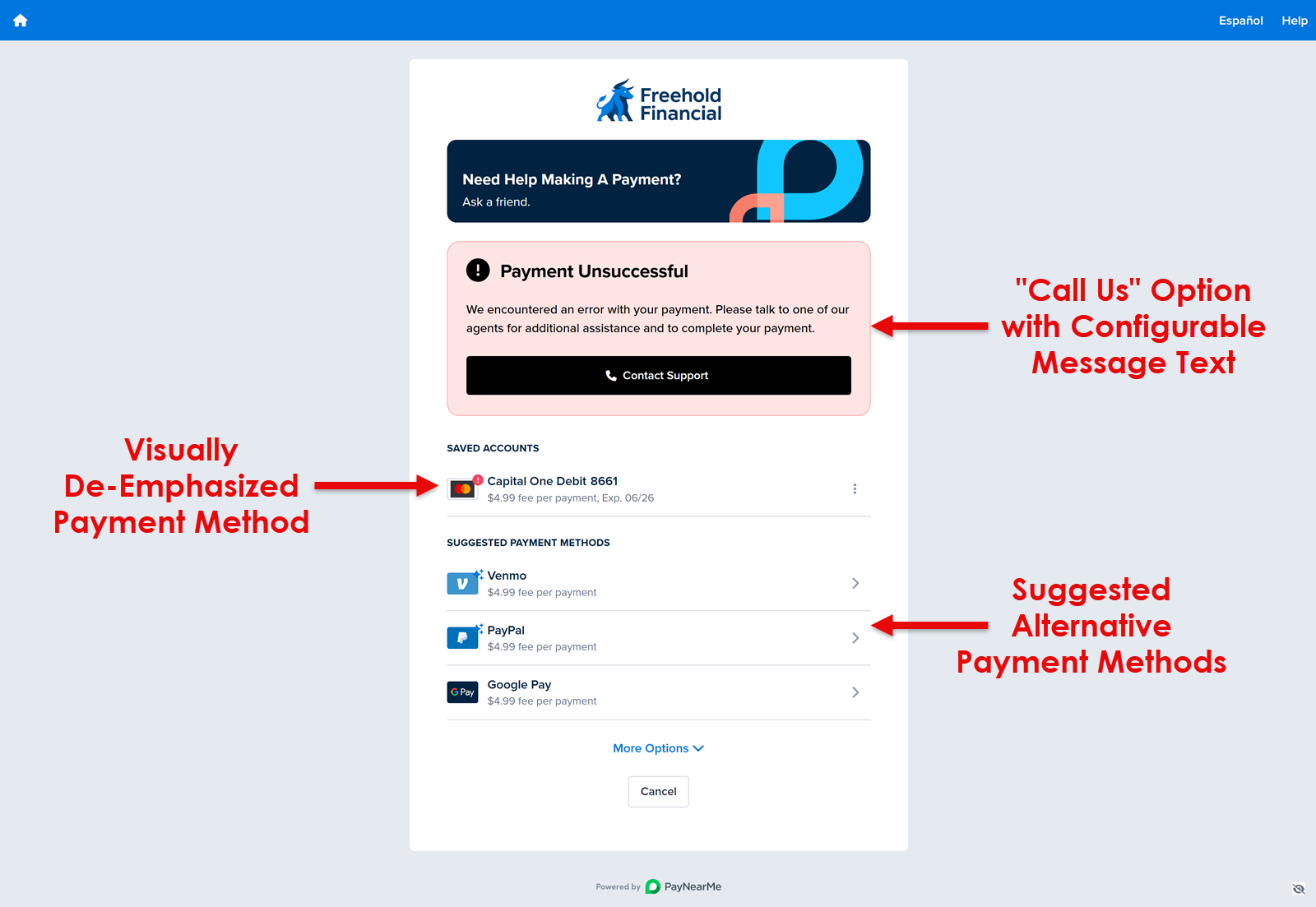
PayNearMe’s Dynamic Payment Options feature helps consumers recover when they hit repeated failures on the same saved payment method during checkout. After a configurable number of consecutive failures (typically two), the payer sees a dedicated fallback experience where the failed method is de-emphasized along with the following fallback options:
- An optional Call Us fallback path with your support number and messaging, and/or
- A list of Fallback Payment Methods ranked by AI-assisted recommendations or standard PayNearMe logic.
The experience is configurable per channel (Consumer Portal or Embedded Client), works alongside your existing payment method setup, and is designed to reduce abandoned payments and support burden while improving customer experience with minimal friction.
How it Works
-
The consumer attempts to pay using a saved payment method. If that same payment method fails two or more times in a row (the threshold is configurable, but two is a typical default), PayNearMe routes the consumer to the fallback experience instead of leaving them on the standard error loop alone.
-
On the fallback screen, the failed payment method is visually de-emphasized. Depending on your program’s settings, the consumer may see:
- An optional Call Us option that uses your support phone number and your custom message (localized where you provide copy), and/or
- An optional suggested alternate payment methods, with the number of suggestions and section label you define. Suggestions use either standard PayNearMe ordering (e.g., surfacing a limited set of the next available methods) or AI-assisted ordering which uses smarter payment method recommendations.
-
When the consumer completes a successful payment, the fallback state clears and the payment flow returns to normal.
Flow Overview
The following diagram summarizes the consumer journey when Dynamic Payment Options is enabled.
flowchart TD
  attemptPayment[Consumer attempts payment with saved tender]
  paymentOk{Payment succeeds?}
  normalEnd[Continue in normal flow]
  thresholdMet{Consecutive failures on same tender meet threshold?}
  fallbackScreen[Fallback screen shown; failed tender de-emphasized]
  recoveryPaths[Optional Call us and/or suggested alternate methods]
  paySuccess{Payment succeeds?}
  cleared[Fallback state clears; experience returns to normal]

  attemptPayment --> paymentOk
  paymentOk -->|Yes| normalEnd
  paymentOk -->|No| thresholdMet
  thresholdMet -->|No| attemptPayment
  thresholdMet -->|Yes| fallbackScreen
  fallbackScreen --> recoveryPaths
  recoveryPaths --> paySuccess
  paySuccess -->|Yes| cleared
  paySuccess -->|No| attemptPayment
ConfigurationAll Dynamic Payment Options settings are applied by PayNearMe on your behalf. Work with your PayNearMe Technical Account Manager (TAM) to choose the options below and to align them with your Embedded Consumer Client or Consumer Portal deployment.
Your Configuration Options
You do not need to perform technical setup yourself, but you should know what can be tailored for your configuration:
- Where the Experience Applies — Do you want to enable the fallback experience for the Consumer Portal, the Embedded Consumer Client, or both, independently?
- Failure Threshold — How many consecutive failed attempts on the same saved tender must occur before the fallback screen appears (default is two)?
- Call Us Path — Should the Call Us option be turned on or off? If turned on you will need to provide the support phone number consumers should dial and supply custom messaging (including localized text where applicable).
- Suggested Alternate Payment Methods — Should suggested payment method options be turned on or off? If turned on, you will need to choose how many alternate methods to surface and set the section heading (including localized labels where applicable).
- How Suggested Payment Methods are Ordered — Do you want to use default PayNearMe ordering or AI-assisted recommendations? If your site uses a limited set of payment methods in the consumer UI, coordinate with your TAM so fallbacks stay consistent with that presentation.
PayNearMe can also measure fallback screen views and outcomes for your configuration to help you understand how often the experience appears and how consumers respond.
Default Ordering Logic vs. AI-Assisted Logic
Default OrderingClients can configure a default order for payment methods on their site. For example, to always show the cash option first, your PayNearMe Technical Account Manager (TAM) can set the site to prioritize that method. This default order is used when AI-assisted ordering is not enabled for the site, or when the AI service that recommends ordering is unavailable or returns an error.
AI-Assisted OrderingWhen AI-assisted ordering is enabled, method order is driven by analysis that estimates which option is most likely to result in a successful payment. The model receives:
- Available payment methods and their service fees
- Device type (mobile vs. desktop)
- Calendar signals: day of week, day of month, and month
- Platform and user agent
- Order ID
After a payment completes, the outcome is sent back to the model so recommendations can improve over time. The model does not receive individual payer payment history; it learns from aggregate conversion patterns across the platform. Clients may also apply a constraint so a specific payment method is always shown first, regardless of the model’s recommendation.
Requirements
- A PayNearMe Technical Account Manager (TAM) (or equivalent implementation contact) to enable and adjust Dynamic Payment Options for your site.
- If you use the Call Us option, a valid support number and approved message copy (and translations, if you serve Spanish-speaking consumers).
- Alternate payment methods enabled and appropriate for your use case, so suggested options are meaningful when that feature is turned on.
Languages and Messaging
Configurable consumer-facing strings for this experience support both English and Spanish by default when you provide the appropriate copy for your configuration.
Updated 25 days ago